Croft Connect Plus brings onboarding, worker records, timekeeping, and payroll preparation together for your H-2A season.
For H-2A employers
Spend less time chasing paperwork, from onboarding to payroll
Your office needs to know who is ready, what is missing, and what needs to happen next.
Croft Connect Plus brings that work together around your job orders, with your workers, agent, and recruiter collaborating in the same platform.
Croft Connect is the free starting point for basic onboarding and shared records. Compare both plans.
Onboarding · Croft Connect Plus
Workers onboard before they arrive
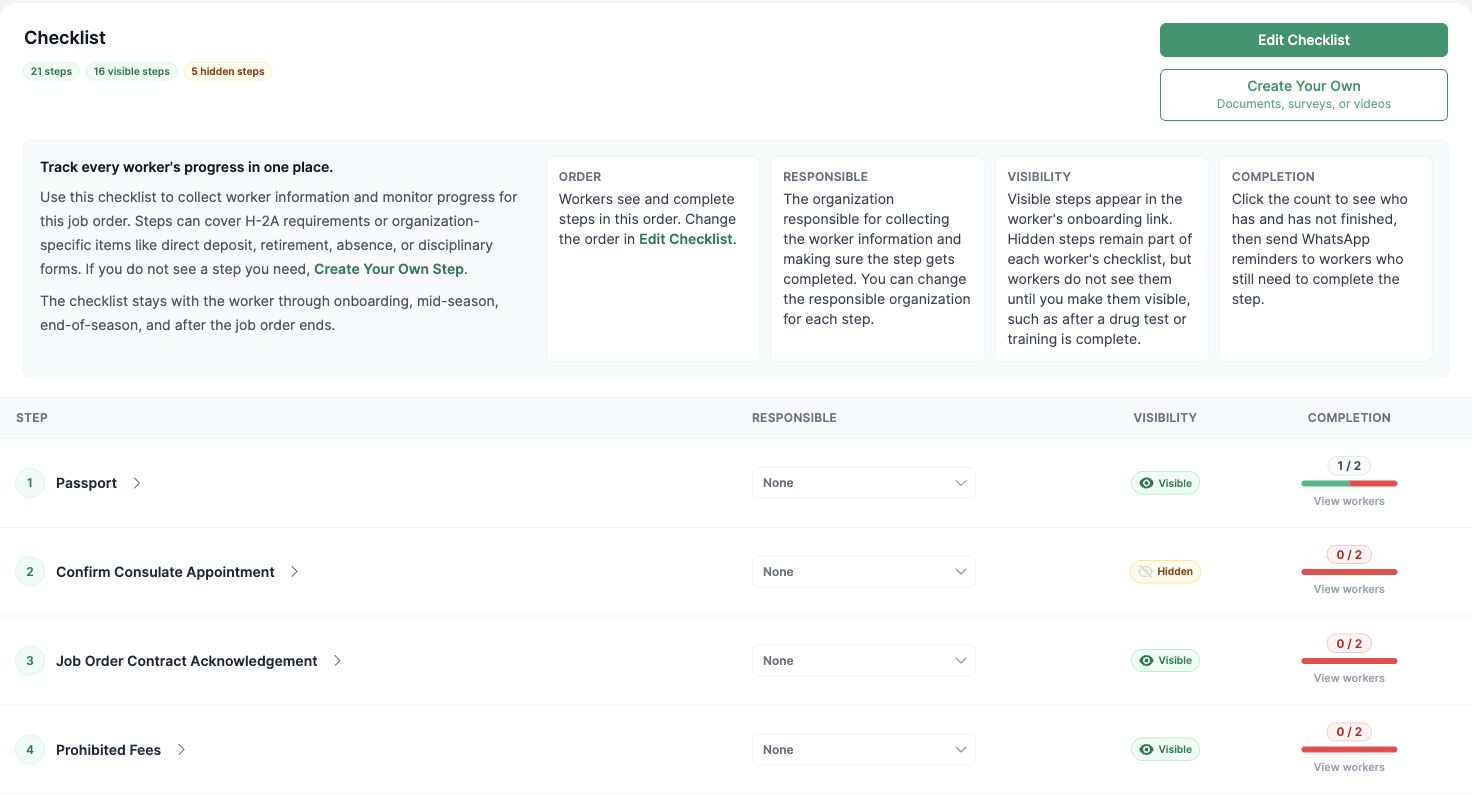
Send workers a WhatsApp link to guided steps in English or Spanish. Your office sees which steps are complete and who still needs a reminder.
Before Croft
Your office collects forms one worker at a time, checks a paper list, and follows up by phone.
With Croft Connect Plus
Workers complete their steps on their phones. Croft prefills supported forms, collects signatures, and sends onboarding reminders, while your team reviews what needs attention.
Collect I-9s, federal and state tax forms, policies, and reimbursement documents.
Add your own documents through Croft Power Forms, plus custom questions and video steps.
Create worker records in bulk from supported identity documents and keep signed documents with the worker and job order.
Check Passport and Job Order Contract Acknowledgment completion from the checklist, then follow up with workers whose steps are still open.
The season · Croft Connect Plus
Know what needs attention throughout the season
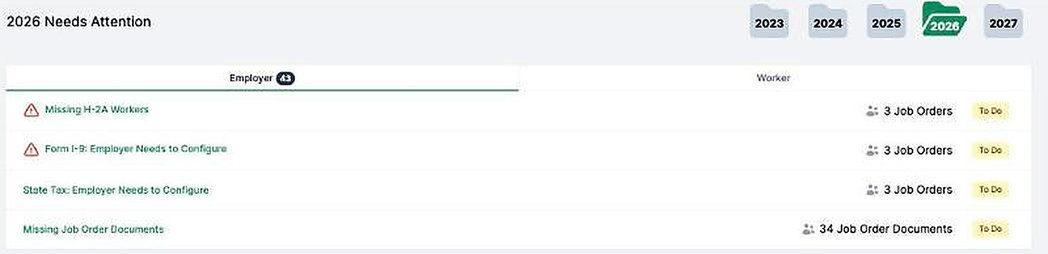
A Needs Attention list brings open work across your job orders into view. Keep the supporting records as arrivals, housing, and worker assignments change.
Before Croft
Housing updates live in a spreadsheet, inspection proof in a folder, and worker changes in a text thread.
With Croft Connect Plus
Your office keeps housing assignments, inspections, travel, discipline, and termination records together, with dated activity and attached documents.
The Needs Attention list counts open items across job orders, so your office can see what to work on next.
Keep trainings, certifications, document-expiration tracking, and 60-day out-of-country proof with the worker record. Bulk actions help your office work through changes across a crew.
Timekeeping and payroll · Croft Connect Plus
H-2A payroll starts with the daily time record
Keep hours offered, hours worked, and the reasons they differ with the job order, before payroll closes. Your payroll provider still handles the paycheck.
H-2A employers record the hours offered each day and why a worker worked fewer hours than offered. A clock-in and clock-out alone do not tell that story. Your job order is already in Croft, so the schedule, worksite, and daily time record can stay together.
Before Croft
At the end of the pay period, your office combines timecards, job-order schedules, and supervisor messages to explain shorter days.
With Croft Connect Plus
The reason stays with the day. Your team reviews flagged shifts and corrections before preparing the pay run.
Illustrative example
Eight hours offered. Six hours worked. Keep the reason with the day.
Hours offered
8hours
Hours worked
6hours
Recorded reason
Personal appointment
Job order A · North Block worksite
The same six-hour total can have different explanations. The reason gives your office a record to review before payroll.
What payroll needs beyond a punch total
Guarantee progress during the seasonCroft shows 3/4 guarantee progress so your office can review gaps while the season is underway.
The job-order terms for each dayKeep time tied to the worksite and job order. Review wage-rate warnings before you lock the pay run.
A record of correctionsMissing clock-outs and long shifts need review. Croft keeps correction history so your team can explain what changed.
Worked and offered hours appear together in Croft’s daily review. Cropped from the Smith Farms demo account.
Keep your payroll provider
Croft prepares gross-pay information, H-2A companion addenda, and audit exports from the reviewed records. Your payroll provider handles taxes, withholdings, net pay, payments, and payroll paystubs. Keep Croft’s companion addenda with those paystubs.
Export files are available in layouts for ADP, Paychex, Paylocity, and QuickBooks.
H-2A rules require records, not a particular app. Croft helps your team capture the daily time facts as the season runs.
Reference: 20 CFR 655.122(i), (j), and (k). For how a rule applies to your job order or workers, confirm with your H-2A agent or counsel.
AI access · Croft Connect Plus
Get answers from your Croft records
Croft MCP to Claude + ChatGPT gives you read-only access to the records your account can access, from the office or the truck.
Before Croft
Answering a question about the crew means opening several screens or exporting a report.
With Croft Connect Plus
Ask your assistant about onboarding, job orders, or timekeeping using your live Croft records.
“Which onboarding steps are still open?”
“Which shifts need review?”
The connector is read-only. Your team reviews and changes records inside Croft. Croft AI document processing is separate: Croft reads supported identity documents and prefills forms for your team to review.
What's included
Choose the support your office needs
Start with shared job orders and basic onboarding, or bring more of the year’s work into Croft Connect Plus.
The starting point
Croft Connect
Free
Basic onboarding and limited H-2A employer and worker management, through your Croft-enabled agent or Croft.
Includes employer Job Order Confirmation, the two worker acknowledgments below, and a 30-day timekeeping trial.
For the full year
Croft Connect Plus
Paid subscription
Add custom documents, more signing workflows, automated reminders, ongoing timekeeping, payroll preparation, and Croft MCP to Claude + ChatGPT.
See the full Croft Connect and Croft Connect Plus comparison
Start with the same job orders
Both plans keep employers, workers, agents, and recruiters working from shared records, within their access.
What your office can do
Croft Connect
Croft Connect Plus
Account prefilled with job orders
Included
Included
Employer dashboard and weekly digest
Included
Included
Job Order Confirmation, reviewed and signed by the employer
Included
Included
Housing, grower, vehicle, and farm asset records
Included
Included
Worker history, messages, and work-authorization alerts
Included
Included
Consulate details, YATRI exports, and arrival coordination
Included
Included
Collect the paperwork from each worker
Workers follow their onboarding steps from a WhatsApp link, in English or Spanish.
What your office can do
Croft Connect
Croft Connect Plus
Phone onboarding and worker-downloadable documents
Included
Included
Worker signatures for Job Order Contract Acknowledgment and Prohibited Fees Acknowledgment
Included
Included
Signature packets for signing multiple documents together
Included for available documents
Included
Additional e-signatures for I-9s, tax forms, policies, reimbursements, and end-of-job-order payouts
Not included
Included
Your own documents through Croft Power Forms
Not included
Included
Automated reminders and custom onboarding or video steps
Not included
Included
Your team configures and reviews the required steps; available forms depend on the worker and job order.
Keep the season on the record
Plus adds the records and bulk activities your office uses as the season changes.
What your office can do
Croft Connect
Croft Connect Plus
Corresponding worker records
Not included
Included
Bulk worker creation from passports and Social Security cards
Not included
Included
Worker tags, advanced search, and bulk grouping
Not included
Included
Bulk housing assignments, move-in history, capacity, and inspections
Not included
Included
In-season and end-of-season travel records
Not included
Included
Discipline, termination, and 60-day out-of-country proof
Not included
Included
Review hours before payroll
Croft Time brings hours, exceptions, and payroll preparation into the same workflow.
What your office can do
Croft Connect
Croft Connect Plus
Mobile timekeeping, geofencing, worker PINs, crews, and the live time board
30-day free trial
Included
Offered and worked hours, 3/4 guarantee pacing, and wage-rate warnings
30-day free trial
Included
Exception review and dated corrections
30-day free trial
Included
Pay runs, wage-statement addenda, and payroll exports
30-day free trial
Included
Prepare and review pay runs in Croft, then export them for your payroll provider. Supported export layouts include ADP, Paychex, Paylocity, QuickBooks, Dayforce, CenterPoint, Datatech, Famous, UKG, and custom layouts. Your payroll provider handles tax withholding, net pay, and the complete paycheck. Export support does not mean a direct API connection.
Ask about the records you can access
Plus adds document processing and read-only access through your AI assistant.
What your office can do
Croft Connect
Croft Connect Plus
Croft MCP to Claude + ChatGPT
Not included
Read-only connector included
Supported identity-document processing by Croft AI
Not included
Included
Bulk document exports and HRIS exports
Not included
Included
Individual document export
Included
Included
Croft MCP to Claude + ChatGPT reads the Croft records your account is authorized to access. The connector does not sign documents, send messages, change records, or post payroll. Croft AI document processing happens inside Croft and is separate from MCP.
Keep records available after the season
Compare document storage and worker comments across the two plans.
What your office can do
Croft Connect
Croft Connect Plus
Document storage
3 years
Unlimited
Worker comments
1 year
Unlimited
Getting started
Start with your own job orders and crews
Croft helps your office get configured, launch worker onboarding, and keep the work moving through the year.
Listen and configureStart with your operation, crews, and how your office works.
Set upBring your job orders, workers, and housing into your account.
LaunchWorkers onboard on their phones in English or Spanish, with hands-on training for your office.
Get supportUse the Help Center and reach Croft by email, phone, or Zoom, weekdays 9-5 ET.
Let’s connect!
Book a walkthrough of Croft Connect Plus for your operation.
We have received your message and will get back to you as soon as possible. Our team is dedicated to providing the best support and we appreciate your patience.